
Why every AI assistant forgets you
Ask an AI assistant what you said in a conversation three weeks ago, and you will get a cheerful approximation or a polite hallucination — not because the model is broken, but because the model is stateless. Every message you send is assembled into a prompt, the prompt is scored against the model's weights, and the whole thing evaporates the moment the response streams out. The context window is working memory: generous in 2026, sometimes larger than a book, but still bounded by what fits in a single request.
This has been the accepted cost of building with LLMs for years. You engineer around it — paste the history back in, summarize, re-prompt, pray — and the forgetting is someone else's problem until it is your support ticket, your lost context, your user re-explaining a decision for the fourth time.
Then two things happened close together. First, the Model Context Protocol (MCP) became the de facto standard for connecting assistants to tools and data — fast enough and broad enough that every major client ships support for it. Second, the ecosystem realized that MCP's plumbing makes memory the most interesting thing you can attach to an assistant. A filesystem server reads your disk. A search server reads the web. A memory server is the only one that changes how the assistant behaves tomorrow based on what you said today. It is the server that remembers you.
This post is a field guide to that category as it stands in mid-2026: what MCP is in one page, why memory became its killer use case, how a memory server actually works end to end, the six servers worth knowing, the four dimensions that separate them, a decision framework, a copy-paste setup, the security caveats nobody puts in the marketing, what a minimal one needs, and where the ecosystem is heading. It is a catalog, not a pitch — every system named here has real tradeoffs, and we will say what they are.
MCP in one page
The Model Context Protocol is an open standard for how AI applications talk to the tools and data sources around them. Before MCP, every integration was bespoke: one adapter per client per tool, N×M connectors, all of them drifting. MCP collapses that into one protocol, the way USB collapsed peripheral connectors or LSP collapsed editor-language integrations.
Anthropic designed MCP and open-sourced it in November 2024. It went from a single-company proposal to a governed standard with unusual speed: on December 9, 2025, Anthropic donated MCP to the newly formed Agentic AI Foundation, a directed fund under the Linux Foundation, co-founded by Anthropic, Block, and OpenAI, with support from Google, Microsoft, AWS, Cloudflare, and Bloomberg. The foundation's founding projects tell you what the industry considered load-bearing: MCP itself, Block's goose agent, and OpenAI's AGENTS.md convention.
The architecture is three roles deep:
- Host — the application that coordinates everything (Claude Desktop, Cursor, an IDE). It owns the conversation.
- Client — one per connection, the component that speaks MCP to a given server.
- Server — the process that provides context: files, code, search, or memory.
Servers expose three kinds of primitives. Tools are functions the model can invoke (call memory.ingest, run a search). Resources are data you can read or subscribe to. Prompts are reusable prompt templates a server offers. Everything rides on JSON-RPC 2.0, and the protocol itself is stateless — a server holds no memory of one call to the next, which is exactly why a memory server is such a surprising thing to build on top of it.
Transport is where local and remote split: stdio for local servers (the client spawns the process, speaks over stdin/stdout), and Streamable HTTP for remote servers (with OAuth recommended for authorization). That one design decision — local servers over stdio — is what makes the whole memory ecosystem possible, because it means you can run a memory server that never touches a network.
Adoption is the part that stopped being debatable. Anthropic reported 97M+ monthly SDK downloads across Python and TypeScript and 10,000+ active public MCP servers in December 2025. The growth has not slowed: the TypeScript SDK alone logged roughly 195 million downloads in the past month (July 7 – August 5, 2026, per the npm API). Every client you already use — Claude and Claude Desktop, Cursor, VS Code, ChatGPT, Gemini, Microsoft Copilot, Windsurf — ships MCP support. The plumbing is settled; the interesting question is what you attach to it.
Why memory became MCP's killer use case
Look at the servers that dominated the early MCP ecosystem and one thing stands out: they are all stateless too. A filesystem server gives the model read access to your disk — but it stores nothing. A GitHub server queries repositories — but it stores nothing. A web-search server returns results — but it stores nothing. Each one is a lens onto a stateful source that lives somewhere else, and none of them change how the assistant behaves over time.
A memory server is the exception, and the exception is the point. It is the only server in the ecosystem that accumulates state from the conversation itself and feeds it back later. Everything you paste, every decision you make, every correction you give — that is the input, and the output is a different assistant next week. Not a smarter model, a better-informed one. The other servers answer "what is on disk?" The memory server answers "what do we know, and what changed since we last talked?"
That is why the category exploded even though it is technically the least glamorous plumbing. Filesystem servers are interchangeable; memory servers are the difference between an assistant that re-explains your own decisions to you and one that picks up mid-thought. And because MCP's stdio transport lets a server run entirely on your machine, memory became the first genuinely personal layer of the stack — the one component where the question "who holds this data?" is decided by which process you point your client at.
How a memory server works end to end
Strip away the branding and every memory server does the same five-stage loop. One conversation, five stages — each turn becomes retrievable context:
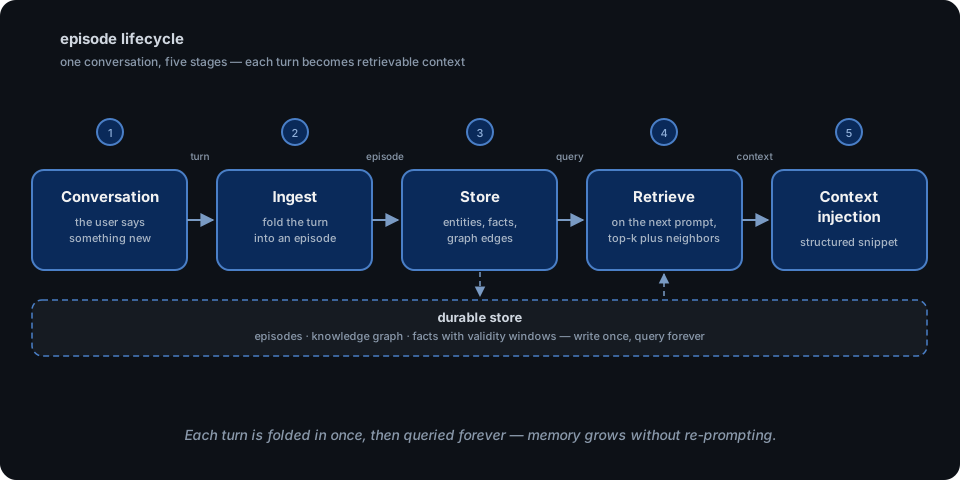
- Conversation message. You say something. The client intercepts it as part of the session.
- Ingest. The server folds the turn into an episode — the unit of memory. Depending on the server this means storing the raw text, extracting entities and facts, embedding chunks, or all three. This is the write path, and it is the stage where most of the engineering effort lives.
- Store. The episode lands in a durable store: a knowledge graph, a fact table, a set of Markdown files, a vector index. Crucially, the store is not an append-only log — it resolves entities and, in temporal systems, supersedes outdated facts rather than accumulating contradictions.
- Retrieve. On the next prompt, the client asks the server for relevant memory: "what do I know that's relevant to this new message?" The server runs its retrieval — similarity search, keyword matching, graph traversal, or all of the above fused.
- Context injection. The retrieved pieces come back as a structured snippet, and the client inserts them into the prompt alongside the current message. The model never queries the store itself; it only ever reads the injected context.
That last step is the part that trips people up, so let's be plain about it. "Context injection" does not mean the assistant has a memory. It means the memory server acts like a librarian who reads the question, walks to the stacks, and hands the model a few pages stapled to the query. The model is still stateless — the server is the one that remembers, and the model is only as good as the pages it gets handed. This is the retrieval gap in a nutshell: a memory server can store everything, but a prompt can hold a few thousand tokens, so the entire value proposition reduces to which pages get stapled on.
That gap is why the category's design space is so wide — different servers make radically different bets about how to pick the pages. Some optimize for raw similarity, some for exact identifiers, some for walking relationships, some for answering "what was true at that time." The whole taxonomy of memory servers is a taxonomy of retrieval bets, which is what the next section maps.
The 2026 landscape
The storage model is the fastest way to classify a memory server, because it determines everything downstream: what the server can answer, what it costs to run, and what it quietly loses. The spectrum runs from the trivial to the expressive:
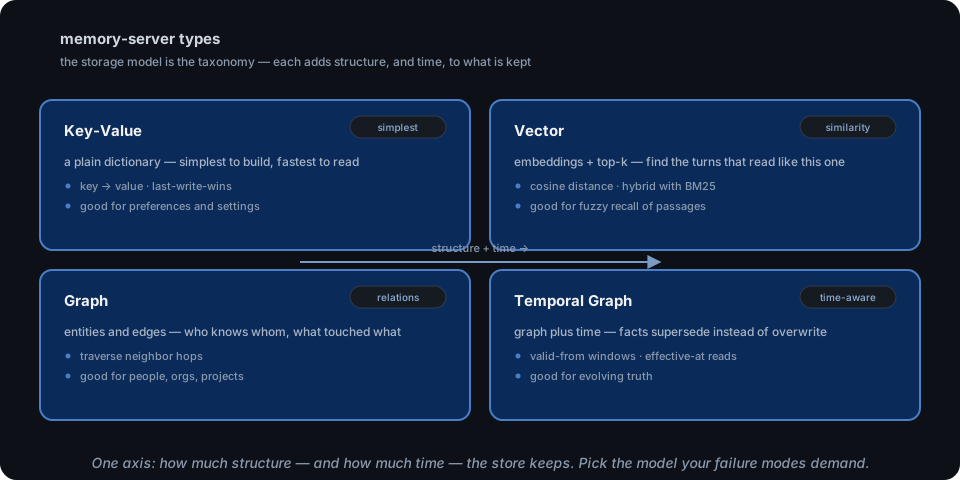
- Key-Value — a plain dictionary. Fastest to build, fastest to read, and blind to meaning. Good for preferences and settings, useless for "what did we discuss."
- Vector — embeddings plus top-k retrieval. Finds the turns that read like the query. The default of the ecosystem, and the floor every server starts from.
- Graph — entities as nodes, relations as edges. Answers "who knows whom, what touched what" via traversal — the only model that can connect two facts that never appear in the same document.
- Temporal Graph — a graph plus time. Facts carry validity windows and supersede rather than overwrite, so "what was true in March" and "what is true now" are both answerable from the same store. This is the model this series has spent the most time on, because it is the only one that survives contact with a changing relationship.
With that spine in place, here is the mid-2026 landscape, six servers, features only — a map of the design space, not a leaderboard:
| server | storage model | retrieval | open source | self-hostable | local-first or hosted |
|---|---|---|---|---|---|
| BasicMemory | Markdown files + knowledge graph + embeddings | Hybrid full-text + vector, optional reranking | AGPL-3.0 | Yes | Local-first (paid cloud add-on) |
| Mem0 MCP | Vector; optional graph memory (off by default) | Hosted API (mcp.mem0.ai) | Apache-2.0 | No — thin wrapper over hosted service | Hosted |
| Hindsight | Temporal graph + associative memory | TEMPR: semantic + keyword + graph + temporal in parallel, merged | MIT | Yes (Docker / Helm / pip) | Local-first; hosted cloud available |
| MemPalace | Verbatim conversation text in wings/rooms/drawers | Semantic search over pluggable backends (ChromaDB, sqlite_exact, milvus, qdrant, pgvector) | MIT | Yes | Local-first |
| Supermemory | Knowledge graph (facts, temporal changes) | Hybrid RAG with reranking | MIT | Yes (single binary; fully offline with Ollama) | Local-first or hosted (SOC 2 Type II) |
| OpenZync | Temporal knowledge graph (episodes, facts, entities) | Hybrid across episodes/facts/entities + graph search | Apache-2.0 | Yes (requires an OpenZync core instance) | Self-hostable |
A few notes that the table can't hold. BasicMemory is the local-first poster child — plain Markdown files that you and your assistant both read and write, with a knowledge graph and embeddings layered on top; its README's stance is "no lock-in, plain Markdown, your data stays yours." Mem0 MCP is a thin wrapper over the Mem0 Memory API: the wrapper repository was archived in March 2026, and the maintained path is the hosted endpoint, which requires a MEM0_API_KEY. Hindsight is the temporal-graph option — its retrieval runs semantic, keyword, graph, and temporal legs in parallel and merges them. MemPalace deliberately stores verbatim conversation text and never summarizes, organizing it into wings (people and projects), rooms (topics), and drawers (original content). Supermemory pitches "one memory across everything you use," with a knowledge graph that tracks facts, temporal changes, and contradictions, plus hybrid retrieval with reranking. Where the older posts in this series mapped agent-memory tools by pattern, this is the same map by MCP plumbing.
Four dimensions that separate them
Once the marketing is stripped, memory servers differ along exactly four axes. If you can place a server on these four, you know its behavior better than its homepage does.
1. Storage model. The taxonomy above is the spine. Key-value is a cache; vector is recall of passages; graph is connection; temporal graph is truth-over-time. Every other dimension is downstream of this one, because the storage model sets the ceiling on what questions the server can answer. A vector store cannot answer "who introduced me to Alex" no matter how good its embeddings are — the answer lives across three documents and requires an edge.
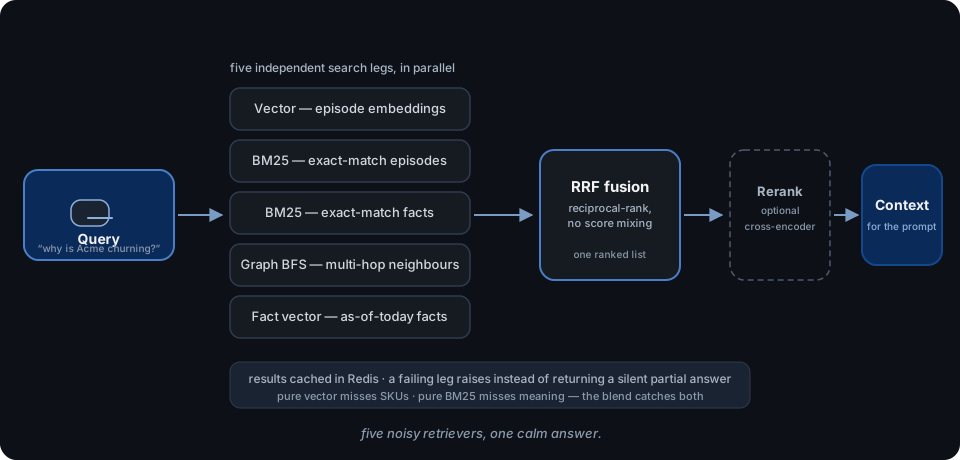
2. Retrieval strategy. The storage model says what you can find; retrieval says what you do find. The spectrum runs from pure top-k similarity (embed the query, return the nearest chunks) to hybrid systems that run several legs in parallel — semantic, exact-keyword, graph traversal — and fuse the ranked lists, typically with reciprocal rank fusion. Hybrid costs more to operate (multiple indexes, fusion tuning) and answers more questions. The rule that holds across the market: single-leg retrieval is for recall of "similar stuff"; hybrid is for "the exact identifier AND the related facts."
3. Hosting. Local, cloud, or self-hosted. Local means the server runs on your machine over stdio and the data never leaves it. Cloud means the vendor runs it and your conversation history is the product input. Self-hosted sits in the middle: you run the server on your own infrastructure, so the data is yours but the operations burden is too. The interesting 2026 pattern is that most servers offer a local-first path and a hosted convenience path, and the choice is usually made on the next dimension rather than this one.
4. Data control. Who sees what you paste? This is the dimension nobody puts on the homepage, and it is the one that actually decides whether a memory server is safe to use for work. Hosted servers see every episode, every fact, every key you ask them to store, on someone else's infrastructure. Local and self-hosted servers keep the data on your side of the network — which trades operational convenience for control. Everything in section nine follows from this dimension, so we will save the details for there.
A decision framework
Five questions, asked in order. They will eliminate most of the field before you look at a single feature list.
1. Where does your data live? If the answer must be "my machine" or "my infrastructure" — work data, client data, anything regulated — you are narrowed to local-first or self-hosted servers immediately. This question filters harder than any other, and it is the cheapest one to answer.
2. Do you need relations or just recall? "What did we say about X" is recall; any server with decent retrieval handles it. "Who else is connected to X" is relations, and it requires a graph. If your assistant's job is questions about a web of people and projects, skip the vector-only servers.
3. Does "what changed" matter? If facts about your world mutate — titles change, plans change, preferences get corrected — you want a temporal model where the correction supersedes the old fact instead of competing with it. If your data is a static corpus, this question is irrelevant and you can take the cheaper path.
4. Do you need a server or a library? A memory server plugs into any MCP client and works across all of them; a library bakes memory into one application. If you want memory that follows you between Cursor and Claude and ChatGPT, you want a server. If you are building one product and only one, a library may be simpler — but you are betting the interface is not going to be standardized later.
5. Do you want to debug it in plain files? This is the most underrated question in the category. A memory server whose storage is inspectable — Markdown files, a SQLite database you can open, a graph you can query by hand — is debuggable and portable. A memory server whose state is a black box is a compliance incident waiting for an auditor.
Once the questions are answered, the mapping is short. Vector suffices when your use case is "recall similar past passages" and your data is stable — personal notes, meeting transcripts you want to re-find, a knowledge base. You need a graph when the questions are relational — org charts, project dependencies, "who knows whom" — because no similarity index can express a hop. Temporal matters when the assistant's answers must be correct as of a date — customer history, account state, anything where a corrected fact should retire its predecessor. Most production use cases drift toward hybrid retrieval over a temporal graph; that is the direction the category moved in, not a coincidence.
If the answer to question one is "my infrastructure," the self-hosted route means you run the core yourself and the memory never leaves your network — OpenZync's MCP server is one such option (Apache-2.0), and its MCP server docs walk through connecting it to a client. Same idea as running any other stateful service you own.
Setting one up
The reason this category exploded is the copy-paste experience. Here is the entire setup for a local-first memory server — BasicMemory — in two steps, straight from its official README.
First, install it (it runs under uv, so uvx will fetch it on demand):
uv tool install basic-memory
Second, add the server to Claude Desktop by editing ~/Library/Application Support/Claude/claude_desktop_config.json:
{
  "mcpServers": {
    "basic-memory": {
      "command": "uvx",
      "args": ["basic-memory", "mcp"]
    }
  }
}
Restart Claude Desktop and you are done. The server spawns locally over stdio — that is the transport we discussed in section two — and your notes live in ~/basic-memory by default. No cloud account, no API key, no data leaving the machine. That is the architecture in the diagram below in miniature: a client, a memory server mediating, and storage underneath.
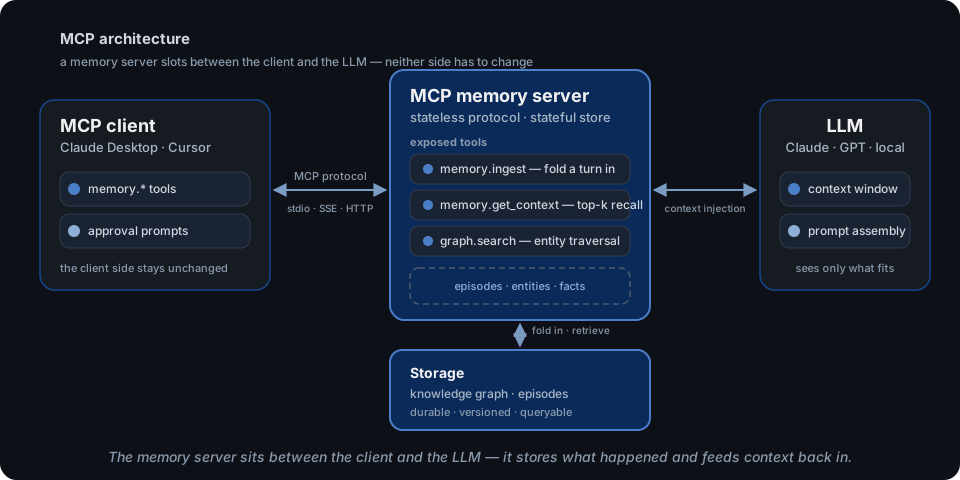
Other clients speak the same server, just through different config files. Cursor reads .cursor/mcp.json (project) or ~/.cursor/mcp.json (global) with the same mcpServers structure. VS Code has native MCP support, configured in your User Settings JSON under mcp.servers. Microsoft Copilot supports MCP servers as well, enabled through its settings — same server, different client. The config format changes; the server does not. This is the entire point of a standard: you set up memory once, and every MCP-speaking client gets it.
One practical note on local servers: because the server is a process your client spawns, the binary needs to be on your PATH and your client needs to be restarted after config changes. Those two gotchas account for most "it's not working" reports in every memory-server issue tracker. The install line above is the actual command from the BasicMemory README, and it is worth verifying the same way for whichever server you choose — which is a perfect segue into the section that matters more than any config file.
The security caveats
Everything above is the fun part. Here is the part that decides whether you should actually install one. Look back at the memory-server diagram: the server sits between you and the model, and everything you paste flows through it. That means a memory server holds the most sensitive data in your entire AI stack — not just queries, but the full conversation history, extracted facts about you and your colleagues, and, in some configurations, the API keys used to talk to the model.
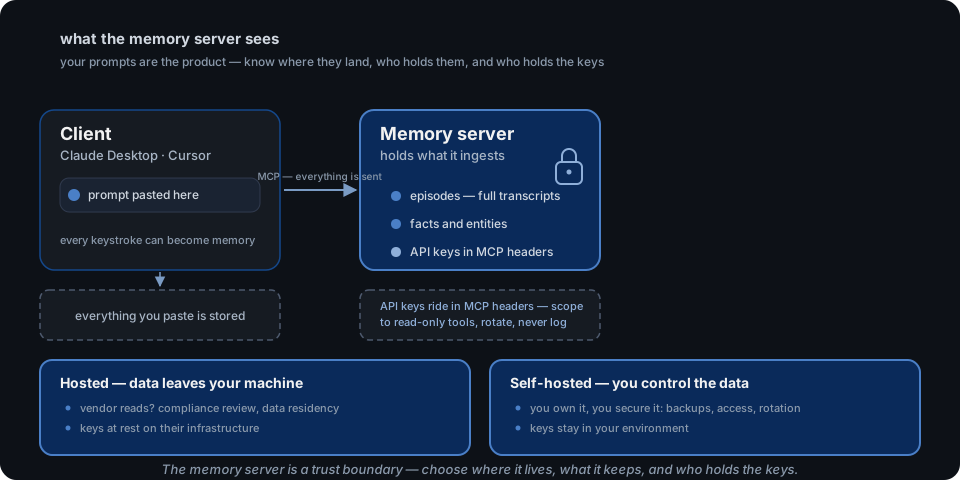
Four caveats, in increasing order of how often they get ignored.
1. Everything you paste is stored. There is no such thing as "just answering this one question" with a memory server attached. Your prompts are the product's input — that is the design. The practical consequence: do not attach a memory server to a session where you would not be comfortable with a transcript being kept. This is not a bug; it is the feature, and it changes which conversations belong in which client.
2. API keys are part of the data. Keys ride in MCP headers or are stored to make the server work, and a memory server that keeps them is a higher-value target than the stateless servers around it. The disciplines are boring and mandatory: scope keys to the minimum tools the server needs (read-only where possible), rotate them, and never log them. A memory server that logs request bodies is exfiltrating your memory one log line at a time.
3. Sandboxing and erasure are your problem. A memory server is a network service running on your machine or your infra, so it gets the same treatment as any other service: least-privilege filesystem access, network boundaries, and a real deletion story. The right-to-erasure question — "what happens when a user asks for their data gone, or GDPR requires it?" — has a very different answer in a temporal system (facts are superseded, history is walkable) than in an append-only store. Decide that answer before someone asks for it, because "we don't delete" is a legal position you want to have chosen on purpose.
4. Verify what you install. The memory ecosystem is young, and the scams are already here. The MemPalace README carries a prominent caution: it has no official websites other than the GitHub repository, the PyPI package, and its docs site — and it warns that lookalike domains (a .me, a .net, other .com variants) "may distribute malware." That warning exists because those impostor domains existed. The rule generalizes to every server in this post: install from the official repository, check the license, and treat any third-party domain offering a memory server as hostile until proven otherwise.
Data residency closes the loop with the decision framework: hosted memory servers mean your pasted context lives on a vendor's infrastructure, subject to their access and their compliance posture; local-first and self-hosted servers keep it on your side of the network, trading convenience for control. Pick the trade deliberately — the memory server is a trust boundary, not a convenience.
The one you'd build yourself
At some point the question inverts: instead of which server to adopt, should I build one? The honest answer is that a minimal memory server is small — embarrassingly small. Four components, and you have probably written three of them before:
- Ingest — a write endpoint that takes a conversation turn and persists it. The hard part is idempotency: replays must be no-ops, or duplicate delivery becomes duplicate memory.
- A durable store — the storage model, and the only component where the taxonomy of section five bites. A SQLite file with a couple of tables beats a vector database for most personal-memory workloads, and it debugs in plain SQL.
- Retrieval — the query path. This is where the design patterns from the earlier post in this series earn their keep: run a few search legs in parallel and fuse the ranks, no LLM at query time.
- An MCP surface — the glue. With FastMCP or the SDK of your choice, exposing three or four tools (
ingest,get_context,search) is an afternoon of work, and suddenly your hand-rolled store works in every MCP client that exists.
So the real question is not "can I build one" — it is "is my memory worth maintaining?" A library-style memory baked into one app is simpler, but it dies with that app. A server lives independently, survives client churn, and keeps one canonical store that every assistant reads. Build when your requirements are unusual enough that the catalog can't serve them — a bespoke domain model, an existing database you want to expose, a retention policy no vendor matches. Adopt when your requirements are "remember what I told it," because that is the most-solved problem in the category.
If you do build, the patterns are already documented: this series' building with graph memory guide covers the five design patterns — episode ingestion, entity resolution, temporal validity, hybrid retrieval, community detection — and the tradeoffs that decide which of them your failure modes actually demand. A memory server is the MCP packaging of those patterns, nothing more.
Where the ecosystem goes next
The direction is already visible, and it is the reason this category is worth watching. Memory servers are converging on cross-client, portable memory: one store, every assistant. Supermemory pitches exactly this — "one memory across everything you use" — and Basic Memory's whole product stance is that your memory should be plain Markdown you can export any time, so no vendor can hold it hostage. Independent practitioners are writing about the same thing from the user side: portable memory across MCP clients, so switching assistants does not mean starting the relationship over. The through-line is "own your memory": the store is the asset, the assistant is the lens, and the two should never be welded together.
The forces pushing this direction are structural, not marketing. MCP already standardized the client-server boundary, which means the memory server is the one component that outlives any single client. The transport already lets it run locally, which means the "your data, your machine" option exists by default. And the storage models are converging on temporal knowledge graphs — the only representation that keeps a long relationship correct over time — which means the interesting competition is no longer "who can recall text" but "who can keep a web of facts true as it changes."
Where that lands is a bet the series has been making since the beginning: memory is a state that has to be engineered, not a retrieval trick you bolt on. If you want memory that lives in your infrastructure — self-hosted, with a temporal knowledge graph, where episodes fold in, facts supersede, and nothing leaves your network — OpenZync is open source (Apache-2.0): the MCP server docs cover connecting a client and the full tool surface, and the openzync-mcp repository is the code itself. Start with the docs, pick the transport, and give your assistant the one thing it has always been missing: a memory that survives the conversation.
This is part of a series on agent memory. Read why context windows aren't memory, then how a temporal knowledge graph is built, then the honest map of agent memory tools, then the five patterns of graph memory.